Thursday, June 17, 2021

How the Service Victoria QR code check-in system can miss out on check-ins

Update #1

I can't replicate the issue today (18/6/21); here's hoping they have fixed it since I recorded the problem on the 17/6/21. Interestingly the last update to the app was on the 9/6/21.


Victoria's QR code contact-tracing check-in system, while addressing an important goal, appears to have a relatively big usability flaw (specifically on the Android App), that can result in check-ins being missed. The problem occurs when using a QR code reader app (e.g. Google Lens) that is not the Service Vic app, but having the Service Vic app installed on the phone. I've been able to semi-regularly reproduce this on my own phone, but haven't tried any others, so I've only got a small sample size.

What's the problem?

The Services Vic app will sometimes ignore the current location, and instead check-in to your previous location a second time. This occurs if you have the Services Vic app installed on your phone, but scan the QR code with a separate QR reader app such as Google Lens.

Steps to reproduce

  1. Ensure that the Service Vic app, and a QR code reader are installed. I have only tested with the Google Lens app, but by my understanding of Android, this should be the same with any QR code reader app.
  2. Check in to a location (initially, it doesn't matter whether through the Services Vic app, or the QR code reader) - let's call this Location 1.
  3. When the "Check-in successful" page in the Services Vic app appears, do not press the "Done" button - leave it there (possibly as proof to the shop you're entering that you've checked in).
  4. Press the Home button on your phone, to put the Services Vic app into the background.
  5. Go to another check-in location (Location 2)
  6. Open Google Lens, point at the QR code for Location 2
  7. Google Lens should now open the Services Vic app, however, the app will still be showing the "Check-in successful" page of Location 1, and not any option to check in to Location 2.
  8. Pressing the "Done" button will take you back to the main page of the Services Vic app. 
  9. Reviewing where you are currently checked in to will show you are checked into Location 1, while Location 2 has not been logged at all.


Why is it a problem?

Because check-in locations might be skipped, and a chain of transmission could be lost.


Why not just use the Services Vic app to read the QR code?

You could, and this would solve the problem. But people use phone in different ways, and might want to use a single QR code reader for all of their QR code reading purposes (e.g. if they travel interstate, and have to use different state check-in systems, or they are used to the one app that they used before there was a unified Services Vic QR code system). And given that the functionality exists within the Services Vic app to accept a QR code (actually, a URL) from another app, this is a valid use case that has already been considered, but implemented incorrectly.


But shouldn't people check their app to make sure they're checked into the right place?

Yes, they should. But some (perhaps many) won't. When you're going shopping and are checking into a new place every couple of minutes, you're probably not going to read the details, you'll just be looking to the "Check-in successful" page, and you're done. Some people are busy, some people don't notice details, some people aren't good with this technology that's been forced on them, some people can't read well. 


What are the technical details?

I haven't delved too deep into this, but from what I know about Android apps (and it's been a couple of years since I've done any development there), here's what I think is going on:
  • When you check in to a location in Services Victoria, it shows the "Check in successful" page; I think this is implemented as an Android Activity.
  • When you go Home, or to another app, the Services Victoria app remains running in the background, with the "Check in successful" activity at the front.
  • When a QR code reader app finds a valid QR code (in this case, for a URL), it fires an Intent  to the rest of the Android system to ask which app is best equipped to handle this particular address.
  • The Services Vic app has previously registered that it's the one for these types of Intents/URLs, so it gets sent the Intent/URL.
  • But the Services Vic app is on the "Check-in successful" activity, which either doesn't know how to deal with the new Intent/URL, or ignores it, and stays on it's current page, and doesn't register the new Check-in location.

Can I see this in action?

Sure, here's a video of me trying to check in to Roti Road, but after scanning the QR code, it goes to "Check-in successful" for the previous location: 


Tuesday, November 6, 2018

Observations of self-paced programming systems for teaching year 8 students

My year 7 and 8 Digital Technologies classes have recently completed a programming course using Grok, which I've also used with year 10s and 11s in the past. It's a relatively straight-forward concept - a set of programming challenges/mini-tasks dispersed among descriptions and examples of what you need to be able to solve it. The examples are interactive - they let you run the code in-line, and also edit it to see what happens if you change something. Students can learn at their own pace.

I started the (mostly unmotivated) year 8 class on a turtle module, thinking this gives them something less abstract to cling onto. Some observations follow:

  • A _lot_ (most) of the students didn't bother reading the explanations and examples, and tried to jump straight to the tasks, whereupon they struggled majorly as they hadn't learned what they need to complete it. One of the main things I needed to do as a teacher was remind students to read the pages before the challenge. I had to do this repeatedly for many students. 
  • Partly due to the above, many students didn't get the idea of a repeat/loop construct, preferring to copy/paste or re-type code multiple times rather than use a for loop. Even after discussion with them, pointing to the pages that step them through this, and showing them how to use such a loop, many still went on (in later exercises) to duplicate code rather than loop.
  • Many students didn't read the error messages from the auto-marking process. Sometimes the error messages gave the wrong line number (e.g. due to un-closed brackets), and sometimes the error message were unintelligible or hard to see (UI issues on a laptop screen).
From the first two points, one conclusion is that students are just trying to rush through the activities as quickly as possible, which makes me think there's a lack of engagement and interest. While the turtle does makes things more appealing to visual learners, I'm thinking it's not enough. Perhaps a more thorough exploration of why we're doing this might also be useful - we did cover this a bit, but perhaps not enough. On the other hand, if not done carefully, this might disengage those students even more - I was hoping that by diving in to building things sooner, more students would be motivated. 

Another emanating theme is the difficulty students have with independent learning. I have found this over a large section of my teaching career - students don't like or know how to work through things by themselves. I don't have a great answer to this, short of researching ways to promote this; perhaps gamify the process a bit more?

The year 7 class, being an accelerated class, didn't have quite as many of the above issues, but they were all still present to a lesser extent. It also helps that year 7s are generally more motivated than year 8s and 9s. The year 7s got through a much harder course in Grok 

Next year I will try the BBC Micro:bits for the first programming activity, as these are quite engaging. Another option worth considering is to start with a simpler approach to following instructions - either unplugged (program the teacher) or with a simpler or less abstract application (LightBot app, or perhaps a simple Robot). I might also consider introducing a project that we'll be working towards _before_ starting Grok so that we have a context and interest for the programming learning. Another thing to try to embed (perhaps less related to anything talked about, but still relevant) is to learn how to read and understand code, not just write it.

Monday, August 28, 2017

AzureAD: attributes, groups and roles in SAML applications

Recently while migrating a bunch of things to AzureAD, I entered attribute hell, where the attributes required by the relying party (application) don't match the attributes sent from the IDP (AzureAD in this case), and the supposed convention of just swapping XML files and everything just working doesn't really work, and the terminology is different between different IDPs, and even IDPs from the same vendor (ADFS and AzureAD). But the biggest discovery was how groups and roles work in AzureAD SAML apps. I'll detail some of the backstory here.

So in the old days, you had an application that uses AD to authenticate, and also determine access levels using AD groups. In some cases these groups might already exist (students and staff), and can be used directly. Sometimes they exist, but the application needs to have a specific name, so you add the group (staff) to another group (appl-staff) and hope the application supports nested groups. Or sometimes they don't exist so you need to create them as required. Maintenance of these groups can suck. An an application tied into the AD has access to all users and all groups in the AD (perhaps this can be restricted using OU permissions, but that again creates maintenance hassles, and I suspect is not so often actually done).

When first trying to get a particular application rolling as an AzureAD SAML app, I tried to expose a user's group memberships as a SAML attribute. Eventually I managed to do this (it wasn't easy, and required powershell, or possibly downloading and upload a manifest JSON file). But this only provides the group GUIDs, not their names, which turns out to be useless for most cases. So this is where application roles come in. When creating a SAML app registration in AzureAD, you can create roles specific to that application (that are not visible anywhere else), then assign users and groups to those roles. So for a particular application (let's say a library system), you might have the roles SuperAdmin, Librarian, Staff and Student. Then you assign users or groups from AzureAD to those roles. When a SAML claim is processed, those roles will come through in the user.assignedroles, which you can map to whatever attribute the application requires (e.g. groupMembership).

This is all really quite sensible and logical.

Except for one thing.

Creating application roles is something of a pain. This seemingly simple thing can't be done through the Azure portal (at least at the time of writing; maybe they'll get to it one day). There are two ways to do this; one is via an application manifest, which the application provider has to provide. However, this assumes that the application provider knows what they're doing, which, in our experiences, hasn't been the case. A description of setting this up using an application manifest is available here and here, but I don't have any experience doing it this way as none of the vendors provided this). The way we did it was with the venerable PowerShell. A code snippet, largely borrowed from this repository follows:

Import-Module AzureAD
connect-azuread

Function CreateAppRole([string] $Name, [string] $Description)
{
    $appRole = New-Object Microsoft.Open.AzureAD.Model.AppRole
    $appRole.AllowedMemberTypes = New-Object System.Collections.Generic.List[string]
    $appRole.AllowedMemberTypes.Add("User");  # this has to be User; we can still add groups to it
    $appRole.DisplayName = $Name
    $appRole.Id = New-Guid
    $appRole.IsEnabled = $true
    $appRole.Description = $Description
    $appRole.Value = $Name;
    return $appRole
}

$app_id = PUT_APPLICATION_OBJECT_ID_HERE  # get this from the portal or some other AzureAD powershell command
$sponsors = CreateAppRole -Name "Librarians" -Description  "Librarian Role"

$app = Get-AzureADApplication -ObjectId $app_id
$appRoles = $app.AppRoles
# $appRoles = New-Object System.Collections.Generic.List[Microsoft.Open.AzureAD.Model.AppRole] # might need this if your app doesn't have any roles yet
$appRoles.add($sponsors)

Set-AzureADApplication  -ObjectId $app_id -AppRoles $appRoles


With app roles created, you can assign users and groups to those roles. In the portal, this is very tedious; whoever wrote that UI should be shot; if you have a lot of them you'll probably want to delve into PowerShell or the Graph API to implement it faster. 

One gotcha is that nested group membership doesn't appear to work, so if you have a role called AppStaff, and assign to that a group called Staff which has as a member another group called Teaching-Staff, and your teachers are only direct members of Teaching-Staff, then those teachers will not get the AppStaff role in the SAML claim - they need to be a direct member of the role group. Perhaps one day MS will implement nested groups for roles, at least as an option. 

Tuesday, October 4, 2016

Hacking an Aldi Cocoon360 360 degree VR camera

This cheap little number is quite decent, and the apps are OK as well. But what if you want more? To live stream from the camera, you turn on Wifi, and connect your phone to the camera's AP. I connected my laptop instead and ran nmap to see what's open - lo an behold, ports 21 (ftp) and 554 (rtsp) are open. Easy. VLC to the rtsp port (rtsp://192.168.1.1) yields a stream straight up. This is almost too easy. 

But how can we change the view that the camera is showing? For this I installed Packet Capture on my phone, and captured a few packets while change the view in the app. At first glance, it seems that it uses FTP for changing the view. The username and password are both wificam (I wonder if this can be changed). After setting passive mode, we get a RETR \FULL_VIEW.BIN; unfortunately this doesn't seem to yield much; it's possibly an update mechanism from the app.

Moving on, we see port 15740 in use. Annoyingly, it's a binary protocol. Playing around and looking at the traffic dump, it seems that a straight replay of the previous commands from the app doesn't quite work - it doesn't give the same response. I suspect there is a handshake going on, but I don't have the time to decipher it at the moment.

Thankfully, it appears that whatever view mode was last set via the Android app persists when watching the RTSP stream, so that might be all I need in order to re-broadcast a live stream.

Annoyingly, the wifi connection on this camera seems to be flaky on the connection phase; specifically both my Android and OSX computer often fail to pick up a DHCP lease.

Monday, September 9, 2013

Software and service development in schools

One of the dilemmas a modern school faces is whether to develop systems and software in-house, or to use an external provider.

The biggest problem with the former is in on-going maintenance, particularly if the lead developer departs the school. And, let's face it, most school IT people aren't software engineers, so development practices aimed at maintainability are likely to be lacking.

On the other hand, external providers often don't quite fit all of the school's need, meaning the school either has to adapt to what the provider can offer, or add a custom system as well, which leads to the problems of multiple systems.

Another possibility is to have an external contract develop the service or system. This can probably work provided that development processes are high quality. Extensive consultation is imperative though - product requirements and specifications are notoriously difficult to lock down, and without a solid understanding of how schools, teachers and students operate, this could be too far removed from the end-user environment to be effective.

The solution to these that has got me thinking (and somewhat excited) of late is to develop open source software/open systems, which a strong focus on community building. In all likelihood, a school will not be unique in it's need for a particular system. In building its own, but making it open source and actively sharing and promoting it to the broader educational community it could alleviate the maintenance problems by 'pooling' the maintenance issues among other users. Schools could also turn this into an income stream by providing paid support or development of specific features. The DISCO ICT management project is one example of such a development practice that looks promising. Community-building takes time and energy, and is often in the skill-set of a software developer or technician - the more successful larger OSS projects often have dedicated non-techie people in this role.


Thursday, July 26, 2012

Communications and the flood of information

We live with too much information. Perhaps work rather than live - the individual can choose what their information landscape looks like outside of work. Here's something of a taxonomy (in our school; likely somewhat similar in many schools):

  • email (access anywhere, anytime)
  • online calendars
  • portals (e.g. compass)
  • intranet/websites
  • social media
  • files on a computer
  • cloud based files/applications
  • smartphone apps
  • tablet apps
  • paper-based chronicles
  • books
Compare to 5 years ago:
  • email (access at laptop on desk, probably wired connection)
  • paper-based chronicles
  • books
  • files on a computer
  • intranet/websites
  • social media
Compare to 10 years ago:
  • email (access via PC)
  • paper-based chronicles
  • books
  • files on a computer
As the process has been quite gradual, there hasn't really been any discussion on the implications of this, nor training on how to manage the flood. This is certainly a workload issue, but for many the situation exists outside of work, or the demarcation of work blurs (this is an issue in itself). And it's not only the implications and training of staff - this applies as much to students.

A major concern here is the signal-to-noise ratio. The noise is both getting more frequent (more communications occuring), and stronger (every communication fighting to stand out). So we end up missing things, and the cycle feeds back into itself. Finding the signal in the noise takes time and energy. There are two possible ways forward: decrease the noise, or filter the noise. The former comes from training, etiquette, and careful selection of systems (perhaps cutting out systems). The latter - training people how to use systems more effectively, and employing smarter/better suited systems.

A (perhaps more important concern) is determining if the flood of information is worth it. And if it's not, whether it can be stopped (you can't stop progress).

This issue will be the focus of discussion for much of the coming year.

Continuous and Connected

On paper, data has to follow slow cycles. Computers deprecate such cycles, but our workflows seem stuck in a paper-based ideology. Here's what's possible now:

Continuous Collection

There is simply no need to have a reporting cycle at the end of each semester, when that data can be continuously gathered throughout the semester.

Continuous Analysis

Then, the data can be continuously looked at, trends noted, students and teachers who are falling behind given a hand. The concept of reporting could almost be dropped. Parents could also be given the data on a continuous basis, but that opens up a separate can of worms.

Multiple Sources

Data is connected. Some systems may try to become the One True Data Source(TM), but in reality they fail, and become just another data source in the equation. Data analysis has to account for this. I don't know how well analysis services can query disparate DB systems - for the moment I'm figuring some synchronisation will be the easiest way to achieve this (i.e. creating One True Data Source(TM) from a number of external ones).

The (newly developed) school reporting package we've just moved to doesn't account for this. It can handle the continuous nature of data collection, but less so the continuous nature of analysis, and barely at all multiple data sources. Those latter two can probably be hacked onto it using some SQL, but it's a shame the analysis and import features of the product itself look to the past more than to the future.

On the other hand, if everything is continuously continuous, we lose milestones, a sense of accomplishment, of finishing something. Our minds may adapt to this in time (facebook status vs a letter to a dear friend, web snippets vs a book, youtube vs a feature movie), but for now there still is probably some need to have clear end points for some of this (i.e. end of semester reports). But that can co-exist with the continuous collection and analysis.

Happiness


How can one measure student happiness? Or anyone's happiness, for that matter.

Yearly or bi-yearly surveys do a decent job of this, but it would be interesting to see an ongoing measure of this during the year, and correlating against other events (start of year, holidays, exam time, even particular days of the week).

On first glance, a simple daily (or weekly) user rating might seem a valid solution. At the start or end of each day/week/class/<insert other time period here> the student clicks a thumbs up or thumbs down (perhaps a 'meh' option there as well). A very blunt instrument, but a starting point nonetheless. Comparisons between students might not be valid, as there are probably different circumstances and interpretations of happiness. But perhaps the more difficult problem is authenticity of the data. Someone writing in their own diary might bare their soul as there is no audience - no-one to witness them in a weak, exposed state. But as soon as there is an audience, things change. A depressed student might not want others to know of this, someone with some problems at home might be fearful of consequences, someone feeling antisocial probably won't want the hassle of someone trying to 'help.' When asked to rate their happiness every morning, students have every right to ask 'why?' or 'who wants to know?' And with good reason - this is personal data, that could be used for evil.

So trust is a huge factor here. The student would need to trust the school, the survey, the system that the reasons behind the data collection are sound. At the start of a student's enrolment, that trust is not there, and that is one of the most useful times to have access to this data.

There are other indicators one try to extract this sort of information from - attendance, participation, performance. But the accuracy of those might not be great, particularly without a baseline to measure against.

Thursday, July 19, 2012

Crash and burn

Over a month since the last weekly review - hardly ideal. There really needed to be one at the end of the previous term, but with reports eating into the start of the holidays, there wasn't quite the closure (nor the time). And bigger things to worry about during the break.

All indications look to a similar term ahead. I'll potentially be out of action for much of term 4, so planning, training and processes need to happen now, but I haven't been able to grab the ear of the powers that be to get this rolling. Will just have to persevere. Still recovering from a cold, so no thoughts for the week in this review; just planning and administrivia.

Thursday, May 31, 2012

Weekly wrap up

A very thoughtful week - discussing and digesting the nature and purposes of data in a school environment. A number of interruptions - from weeks past going on PD and a study tour to Bendigo, to various meetings with a variety of people (Monash Security, a Swiss International School, Samsung, Monash eSolutions strategic consultant, Cisco wireless engineers, and then some).

Any scheduled meeting inherently affects what I do on that day. I won't get started on something I know could take hours if a meeting is coming up, even though I'd likely get interrupted and not spend hours on it anyway. A little mental barrier to overcome, or work with.

Anyway, on to the thoughtful stuff: system control vs individual control. I've been looking at this through the lens of data collection, and more specifically, assessment. The more control put into the system, the more useful data becomes at a systematic level. Certain individual tasks can be automated and removed from the individual. Decisions can be removed from the individual (this can be a good thing as well as bad). Things can get consistent - from a student's (and administrator's) point of view this can be a great thing. The flip side is that systems bring momentum, and become hard to change. Individuals can experiment, try new things when there are fewer system constraints. Our school has long been down the individual (or small group) end of the scale. Teachers and subject groups can use what they want, adapt how they see fit. Play around with stuff, and keep what works. The drawback is in sharing what works, and building a useful body of student data - with no consistent performance measures, this is difficult to achieve. The next question is to ask to what end this data is being collected and used - I can see in a typical school why this is done, but JMSS ain't no typical school. Also, I need think about how badges can fit into this equation.

Wednesday, May 30, 2012

Assessment indicators

In our discussions on educational data analysis and reporting, we've been looking at what data to collect and display, and what to compare it against. A student at JMSS will study some subjects in year 10. Those have some assessment tasks, and are also given VELS scores. Some subjects carry across both semesters, some don't. The student will study a completely different set of subjects in Year 11. Some will have a certain amount of carry-through, many won't. These subjects have assessment tasks, and VCE outcomes, which are pass/fail. Year 12 is similar, but slightly different again.

Any piece of data, to be meaningful, requires a context. It needs more data around it. That can be provided by time, by peer data, goals, and more. The effect of our situation is that there is no meaningful data to compare over time, nor for the student to set goals against. We could aggregate certain assessment data at the end of each semester, and use that, but a semester is a long time, and subjects are quite diverse, as are the assessments and marking practices even within one subject group. We could compare a student's datum against the cohort (e.g. place that student on a box-and-whisker plot), but that arguably doesn't achieve much - it's basically a league table, and this sort of competition can be counter-productive.

This is where VELS is really quite nice. It provides a consistent set of indicators across year levels. Perhaps we need to extend collection of VELS data beyond year 10, or develop our own set of indicators. This would increase teachers' assessment and reporting workload, and thus would need to be extremely well thought out, and in fact integrated. If every assessment task used a rubric that related directly back to these indicators, then the mere act of marking the assessment would cover that extra work. Developing these indicators would be no mean feat - curriculum frameworks take time to develop. But informal discussions have suggested at least two faculties have already been considering such a set of indicators - maybe it's worth investigating.

It is worth asking, if we can't use assessment data meaningfully, what is the purpose of that assessment?

(The data discussed here is what is directly linked to assessment items - i.e. markable things. We also have monthly progress reports which we can use the data for more meaningfully)

Sunday, May 27, 2012

The School and the Software Developer


JMSS have much of their eServices in the cloud, or running locally but created and maintained by an external provider. Basically, most things are commodity systems.

Department Systems

The Department tries to provide all systems that a school would need. Unfortunately, being a large bureaucracy, it doesn't do a particularly good job fitting to any one school's needs. Nonetheless, there are certain mandated IT systems in place, which we have to use, or at least interface with. Smaller school tend to rely on these systems due to financial reasons.

Commodity systems

Things not covered by the department, or not done well are often outsourced. This might be a service in the cloud, a service hosted locally but maintained remotely, or hosted locally with support provided. Some of these may fill the exact niche required. They tend to be written by organisations specialising in that type of software or service, so have plenty of experience of multiple clients to go off. Some may fit well enough, or provide some flexibility in their implementation. Others fit well enough at the time of commissioning, but can't adapt to the school's changing circumstances or requirements.

Home-grown systems

Where an outsourced system isn't available, is too expensive, doesn't fit, or isn't agile enough, schools can implement home-grown systems. This obviously requires a developer (or team thereof). While a home grown system can be tailored exactly to the school's requirements (even moving targets), the big down-side is maintainability. Programmers don't come cheap, and sysadmins who try their hand at programming may not be sufficiently skilled in software liffecycle management - documentation, maintenance, scaling. When the person who wrote the software leaves - what happens then?

This leads us to the role of the programmer in the school. There are three options:
  1. Settle for a less-than-ideal solution by using a department or commodity system.
  1. Work closely with a company to create/modify and maintain a custom system
  1. Employ a developer (or team thereof).

While option 1 might be the only way for some schools, I shall not seriously consider it here. Option 2 is a viable possibility, but most software development organisations work for business (there being all the money). They don't necessarily have an understanding of the needs of an education environment. Further, this options requires someone at the school to create a watertight specification of the service required. In doing that, you're half-way to option 3. Before embarking on a school driven software project, however, a spec is certainly needed, and processes need to be in place. Source code management, a documentation system and convention, and succession plan. My preference is for small components that work with other systems (be they home-grown, commodity, or department). Modularity leads to flexibility, and agility. 

Wednesday, May 2, 2012

On multiple systems


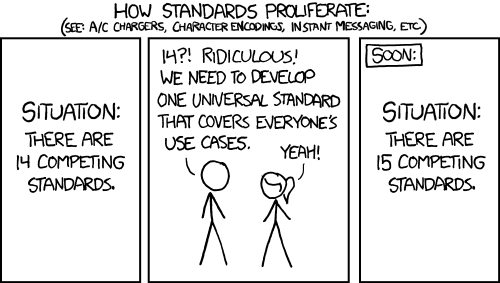
Before I get started, a comic:

(source: xkcd.com/927)

Not quite the same, but very similar to the multitude of ICT systems we use at JMSS. The Department of Education provides the school with CASES (the central school admin system), which does some things, but falls behind in access and UI. So some smart people developed Compass. In an earlier day and age, a school's techies might develop their own DB systems to keep track of their school's data (attendance, timetabling, reporting, finances, etc etc). But in-house developed software requires maintenance, which might not be feasible in small organisations like schools. I understand that Compass grew out of such a system, but the development and maintenance happens elsewhere. Great. Only, rather than replacing all of the existing systems, it adds to them. While it has messaging capabilities, people still use email. There is a schedule, but only for school events, and it doesn't gel with our calendaring system quite as nicely as you'd like. Purchase orders still require a print-out. We use a seperate timetable system, and reporting has been put on hold. Which is what I'm leading in to. We do semester reports using Accelerus - a dedicated system for assessment data reporting and analysis. But interim reports go to Compass. Compass doesn't do much with them except present them to parents and students, so one of our staff members developed an Excel sheet to present this data in a colourful format that can be filtered by student, tute group, etc, so tutors can get an idea of where their cohort is at. We've now cut off parent access to the interim reports, and are using them for school use only. So: Interim report data entry: Compass (web based). Interim report analysis: Excel. Semester report entry: Accelerus. Semester report analysis: Accelerus. Semeter report parent viewing: Compass. Is that too much? Should there be one system to rule them all, or does diversity bring resilience? If a teacher has to enter three different spaces to gather the data on a student/class/subject/etc, they might start forgetting about which is which. They might have different representations, or not 'link' together. Or perhaps I'm trying to dumb this down too much. It is a complicated problem. These aren't even all of the relevant data we have on each student.

The same goes for any other system. As soon as 'one system to rule them all' is implemented, another requirement arises that can't or won't be implemented in that system. Someone will come along and implement it independently. They might talk to some extent, but there are now two systems. Big systems have large momentum, and don't respond quickly to user needs. Small, independent, communicating systems (The Unix Way) help, but with heavily interlinked data, how do they fit in?

Tuesday, May 1, 2012

A meta-reflection


Most of the blogs I read are somewhat widely read. The blogger writes for an audience: an audience that is mostly unknown, perhaps loosely known through some comments/social systems, and maybe a few well-known readers. The style of writing is thus quite different for writing for oneself, or a small, well-known audience - among other things, context is a major thing. How much background info does one need to detail? Such reflection is certainly useful for later reading by oneself, and may at some later point attract readers, so in one sense, one should probably write as though one has an unknown audience. Even if that unknown audience is one's future self. Still, it feels awkward to be writing to many, when one knows that in fact very few (if any) people are actually reading it now.

I usually start a reflection spree with some meta-reflection such as this; some actual content will be forthcoming.

Wednesday, August 17, 2011

Some musings on security

Security is a chain; the chain is only as strong as its weakest link. The chain extends a long, long way. The kinds of things involved in the chain include (in no particular order), the server software, server hardware, client software, client hardware, backup tapes, LAN, WAN/Internet, wireless networks, backup tapes, passwords, people peering over your shoulder, and the actual users of the system. The latter is generally the weakest part of the chain.

But before we get to that, a diversion to the server side. We recently purchased a subscription to an online service for our school. I didn't have any part in the evaluation of the product, but looking at it once connected, soon saw that the administrator user could see all users' passwords. Fail. Passwords on the server should never, but never be recoverable. The reasons for this are plastered all over the Internet, and relevant literature; I won't go into them here. Additionally, the server did not use an encrypted connection to accept passwords; the password went in cleartext from client to server. Two major security flaws in the one product does not provide much confidence in the designers of the product. What other holes are there in the product, waiting to be exploited? I'll bet little Bobby Tables is just waiting to get in there. The designers of the software might think security holes will only affect their system; they'd be wrong. Password re-use is rampant; an exploit of one site will likely lead to other accounts being compromised.

So, if web-software designers (of quite a popular product in the education sector, I might add) have virtually no idea of basic security principles (I certainly don't recall learning any of that in my Computer Science and Computer Engineering courses), what do we expect of the end-user? We might tell people not to re-use passwords, but who's going to remember a unique password for every site they register on? It's just not going to happen. There has been much discussion on this topic of late, brought on by this comic.

The end-user is (usually) the weakest link in the chain, being human, and in all likelihood, having no idea about security principles. And there are two things (or lack thereof) that make them the weakest link: Usability and education.

Usability in Security: The people who implement security are generally nerds who know a hell of a lot about security. Unfortunately, they don't tend to know much about usability, or user experience (UX) as it's now known. That's a broad, sweeping statement, and I'm sure there are plenty of counter-examples, so apologies to those unfairly tarred by that brush. But any technical security must be balanced with usability. There is no point having a complex password requirement, and resetting passwords regularly if the user won't remember them: they will just write the password on a sticky-note, stuck to the screen. The computer-side security might be strong, but the user has just shifted the security hole beyond the reach of the computer. Users will always find a way to do this. Nothing can be idiot-proof, because idiots are so ingenious.

Security in Education: We do not teach security anywhere. There might be mention of it in the Victorian curriculum, but in passing. Most schools do not have a separate IT subject anymore; the trend has been to integrate it into other subjects. Most teachers I know know less about security than the students they teach. There needs to be some expertise in teaching this, which is currently not being met. The Hacker High School project attempts to cover this, but is excessively technical, and perhaps with an ill-thought-out name. Where are people expected to learn this sort of thing? From the occasional email that the bank sends? Does anyone actually read those? You might think that banks would be interested in getting this into the curriculum, given that they tend to be the primary target of this sort of thing. Perhaps we need to form some partnerships with them.

Perhaps biometrics (fingerprint scanners, iris scanners) will fill in some of these holes, but even they require the hardware to be fully trusted, which is difficult when dealing with user-owned devices. A fully networked world will be full of exploits until that weakest link is somehow strengthened. (Bruce Schneier's upcoming book on security from a societal perspective should be interesting).

Wednesday, March 23, 2011

The advantages of the teaching IT manager

I like to play with new technologies. There are plenty of interesting things out there, but a recurring problem of mine has been to actually put them in effective use in the classroom or school setting. Some people and places respond well to “Here’s something cool – go play with it.” They will play, explore what’s possible, what could go wrong, and if things add up, put it into use. Many people don’t – they’d (rightly) need to see some examples of use, and the benefits. So some technologies get left behind, sometimes because they’re dud technologies, sometimes because no-one’s given it a good shot. Which is where having a teaching load on top of the IT manager job is really quite nice. You can experiment on your class. You have a context in which to use such technologies. That’s not to say other analysis doesn’t need to happen – an assessment of the tech needs to take place before and after. But it provides a starting point for further discussion.
 For example, a few weeks ago on the weekend I set up a Q-and-A site ask.jmss.monash.edu based on the open source OSQA software. It is based on stackoverflow (now the stack-exchange collection of sites) – some kind of merging of social networking, forums, and news sites. I’m not aware of any school using this type of software. I deployed this to my IT class to get an idea of how students would use it. Certianly, it was a small and unrepresentative sample, but within a couple of days I had some idea of how what students were doing that was productive, unproductive, good, and evil, and some clues on how it might go pushed out further. Now I can enter into discussion with other staff on how they might use it, and have some starting points (good and bad) that otherwise would not be there.
Similarly, my increased use of google sites (or at least more ownership in my use of it) has given me better ideas how to make the most of it in class.
I’ve started using google presentations for most of my classes (at least in classes where it fits); this lets me embed the lesson in the subject webpage, and the students can look along as they go, or refer back at a later point. A small change to attaching a powerpoint, but I didn’t know that was possible until the classroom opportunity presented it. Last class I tried giving one student write permissions to one such presentation, and making him the ‘scribe’ for any blank ‘discussion’ slides. It went quite well, both for the student (I picked one who was often distracted or disengaged), and the rest of the class (down the track).
Without the teaching load, I wouldn’t know about these things. I think I’ll aim to try one new technology (however small) each week.  

Sunday, February 20, 2011

A question of control

The issue is seemingly minor, yet opens up a major question. We use Google Apps for our communication and collaboration needs. One of the features is Google Groups - this allows for mailing lists, web forums, and access control. Now, anybody in the school can create a group. I could turn this feature off, but don't really see any reason why. At the same time, I create (via some scripts and magic sauce), the entire range of class, house, and staff groups. In the long term, these will be automagically synchronised to the Single Authoritative Data Source, though for now it's a hodge-podge of scripting and manual intervention. In preparing for the deletion of last year's groups, I asked staff if there are any groups that need to be saved or archived. This showed me that a number of staff had created their own groups for various purposes - staff, class, etc. Here lies the question: how much control over this do I want? It is certainly less work for me if the staff create their own groups as needed - this is simple enough for them to do, disperses control, and empowers the staff in the ICT realm. On the other hand, if everything is automated, that should be less work for the teachers and would make life easier for less techy teachers. Such a system would need to be quickly responsive to changes in group memberships, which it hasn't always been.

And having both systems side-by-side could get messy - I'm happy for ad-hoc groups to be created as needed, but having two groups for the same purpose is messy, and will get confusing in the long term.

Giving this to the teachers cedes control. Which I shouldn't have any issues with, but strangely find creeping into my thoughts increasingly.

The other point this issue raises is the lack of a forum to discuss this sort of thing. I'm happy to make certain decisions, but some things (like this) should be open to discussion by the user base, but there is no real place for this discussion to occur. Not enough of the staff seem to be on twitter or facebook to be representative, the staff@ group I prefer to keep as announcement only, and staff meetings are already overloaded as it is. Perhaps I'll set up an opt-in staff-discuss@ group for this purpose.

Thursday, February 10, 2011

Tablet rollout and distribution

Manic. As usual. Well, perhaps not quite as usual. Things are quietening down a little now, though as soon as I look at the work I've been pushing aside things will no doubt pick up again. This rant will try to cover the tablet rollout process, and the good and the bad.

Timing. Hmmm, not to sure about this. I suppose things went on time to some degree - at least much more on time than last year. Though the delay in shipment last year meant that we could chase up students who hadn't paid, and get them all out just about at the same time. The timeline was much tighter this year.

Communication and Coordination. We really could have better communicated with staff what to expect with the tablet rollout. After the initial handout, there were perhaps 30-40 students still without tablets. Classes, however, went on (as far as I can gather) as though every student had a tablet, hence some students were missing out/falling behind. Staff should have been forewarned about this, to plan lessons accordingly. Additionally, I should have better co-ordinated the handout day with the other staff to prevent collisions and students being in the wrong place etc.


Monash network and tech stuff. This needs to be majorly fixed for next time. The imaging process needs to happen on the Monash net. Ideally, using WDS, the machine is plugged into the network, PXE booted, then everything else is automatic. The major bit that didn't work (I really should have done an end-to-end test) was the AD accounts. User accounts created in MDS don't shift across to AD until the user has changed their initial password. This creates a chicken-egg situation, since they need to have a computer in order to change their password. Hopefully we can change the process for next year so the AD account is created straight up. Additionally, we really need domain logons to work via the wireless. Hopefully this is forthcoming. We will be moving on these things in the coming weeks on the way to re-imaging the 2010 tablets - this will be a good test for future years. (Of course, in future years we'll probably have moved away from PC tablet devices)


Distribution. The distribution model this year was one house at a time. This disrupts classes pretty badly. Though it was a very disrupted day anyway. It is also a lot of students, at the same time, not that many students. Some aspects (e.g. email, compass, basic overview) would be better done with the whole year at once, other aspects (initial login) needed to happen in smaller groups. Problem solving on the fly was tricky - mostly the students had to wait till the session was over. If the initial network login problems can be fixed for next time, the distribution would be a lot less painful, but that's completely dependent on Monash. Additionally, the account slips could have had some info clearer, and more instructions/URLs. A model some other school uses involves making an evening out of it, with parents involved. The logistics would be tricky, but would also put some more pride and excitement into the affair.